Search The Support Knowledgebase


(database of technical support questions and answers):
   

Author Topic: RaceRoom Racing Experience with ButtonBox

Offline zappadoc

  • Management
  • Suppreme Master Sensei
  • *
  • *
  • *
  • Posts: 5787
  • No email or PM support
    • ZDoc Dev Blog
RaceRoom Racing Experience with ButtonBox
« on: April 15, 2016, 03:21:47 PM »
R3E Tutorial using the VDASH-EMU ButtonBox:

*****************************************************************************************

ATTENTION:
Since version 3.4.6.3 of SLIMax Manager Pro the Virtual To Real (V2R) USB Controller
is recommended as it gives you the possibility to use your VDASH-EMU button Box as A REAL Button-Box!
See the Virtual To Real User Guide for more info...


*****************************************************************************************


Here is some steps to change the Brake Bias on Race Room Racing Experience,

Race Room Racing Experience:
open controls settings
set Brake Biais Front  = B
set Brake Bias Rear = V


SLIMax Manager Pro:

0 Open Advanced Setup Options
1 click the VDASHEMU icon on top to select default setup
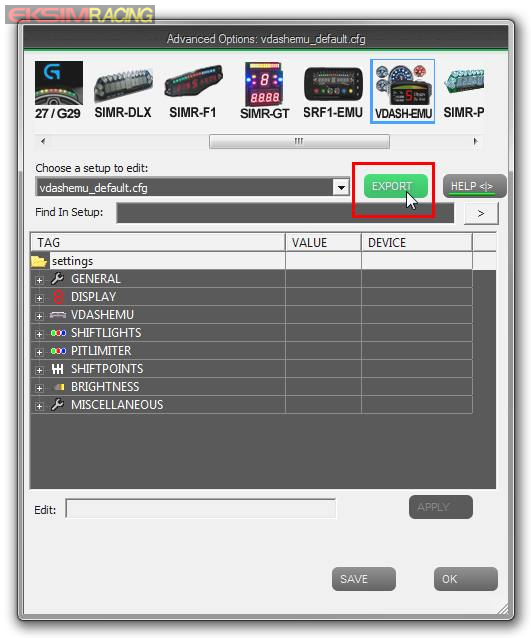


2 Click the EXPORT button to create a new setup based on default with the name: vdashemu_bbox_test
3 open the VDASHEMU > buttons_keys_mapping_list


4 click line 1 for button 1 of the ButtonBox
5 type V in Key field
6 click Key1 button

do the same thing for line 2 (button 2 of the BBox), type B, click Key1 button
then click OK


7 click the APPLY button to confirm your change
8 and SAVE your setup


9 now select the new setup named vdashemu_bbox-test


VDASHEMU ButtonBox

rename button 1 and 2 with B.BIAS - and B.BIAS + and save
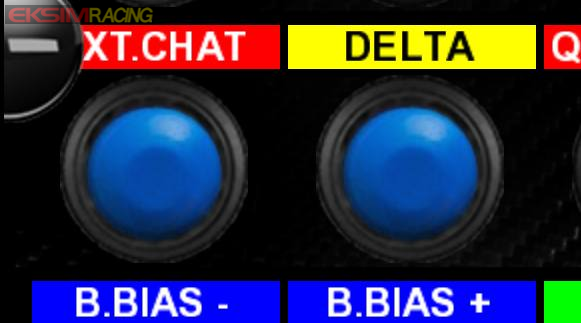


that's it!


No support will be provided by PM or EMAIL, PM has been disabled due to heavy spam and abuse, please post in the support boards, thanks for your understanding.

Offline zappadoc

  • Management
  • Suppreme Master Sensei
  • *
  • *
  • *
  • Posts: 5787
  • No email or PM support
    • ZDoc Dev Blog
Re: RaceRoom Racing Experience with ButtonBox
« Reply #1 on: April 15, 2016, 03:22:07 PM »
You can now change the Brake bias of simulation Race Room Racing Experience with button 1 and 2 of the VDASH-EMU buttonbox.

This is the basic process to create MACRO (sequence of keystrokes) and to map these MACRO to buttons of the buttonBox.

Obviously you need to know the index of buttons. The index of buttons/encoders are HERE in getting started section and in the example above we use ONLY the button 1 and 2 (blue on bottom left).

Index of buttons/encoders/switches are displayed in EDITOR MODE:


Cheers,
z
No support will be provided by PM or EMAIL, PM has been disabled due to heavy spam and abuse, please post in the support boards, thanks for your understanding.