Hi,
I take the opportunity of the release by Makefred of the Alpine A110 GT4/CUP template for VDASH-EMU to make this quick tuto to explain how to reproduce the rev lights bar of the GT4 racing display based on this video:
1. create a SUPER GAUGE object:

Set background color to light-gray
and top tiles color to green

Edit properties of the object (see the screenshot):
Engine RPM and MAX RPM values,
Maximize the tiles
and put in EVAL field the following formula:
if(enginerpm<=4800, DATA, 0)
which means green are shown when rpm is under 4800 rpm
close properties
2. duplicate this gauge object
Set background color to transparent
and top tiles color to yellow
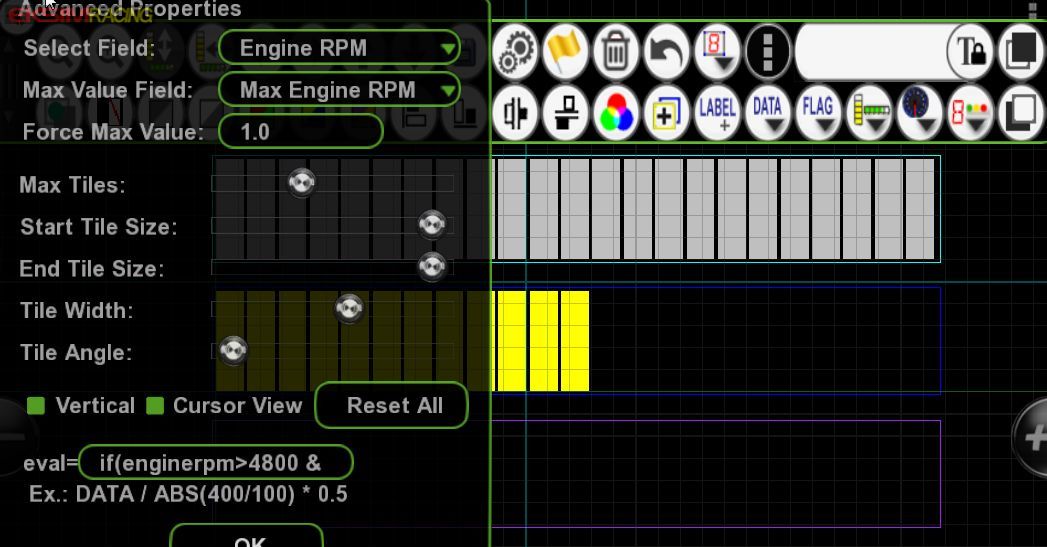
edit the properties and change the formula of EVAL field with:
if(enginerpm>4800 && enginerpm<=6200, DATA, 0)
which means yellow tiles are shown when rpm value is between 4800 and 6200 rpm
close properties
3. duplicate the yellow gauge
Set background color to tranparent
and top tiles color to red

edit the properties and change the formula of EVAL field with:
if(enginerpm>6200, DATA, 0)
which means red tiles are shown when rpm value is greater than 6200 rpm
close properties
now place the first (green) gauge on your page
select the others gauges (yellow and green)
and click the align left and align bottom buttons

that's it!
