OpenSR is available now!

OpenSR is the new free application that replaces everything I have developed for the sim racing community since 2007. You could say this is my legacy project. No licenses, no activation fees, no paid versions. OpenSR is free for everyone.
Cheers!
Zappadoc
The current devices supported by OpenSR (2026-09)Leo Bodnar Shift-Lights Interface (SLI)
USB Shift lights Interface ( SLI-F1, SLI-PRO, SLI-M and SLI-FTEC - Fanatec USB Rim Conversion Kit)
ThrustmasterTS-PC Racer Ferrari 488 Challenge Edition
Fanatec rim
The software manages all Fanatec hardware supported by the version 4.06 of the official Fanatec SDK.
VDASH-EMU Sim Racing Digital Dash. VDASH-EMU Android/Windows sim racing digital dash. VDASH-EMU For Windows includes the native support of VoCore screens and STREAM DECK.
SimDisplay Sim Racing Devices
SIM RACE LCD, SIM RACE F1, SIM RACE Deluxe or SIM RACE PRO USB Shift lights Display devices from SIM Display
Steelseries SRW-S1 steering wheel
VoCoreUSB Screen 4", 4.3", 5", 6.8" and Round as backend of VDASH-EMU For Windows
STREAM DECK (standalone mode)MK2 and XL v1/v2 as backend of VDASH-EMU For Windows
V2R Controller Based On Adafruit Trinket M015 RPM LEDs, 6 FLAG LEDs supported as backend of VDASH-EMU For Windows
AMC Thanos ControllerOpenSR now supports the AMC Thanos motion controller as a backend of 3DOF Motion Simulator plugin (still a w.i.p....), enabling direct control of compatible motion platforms with low-latency telemetry and seamless integration through the OpenSR plugin system.
Arduino BoardSparkFun Pro Micro (32u4)
Raspberry Pi Pico
Raspberry Pi Pico W
Raspberry Pi Pico 2
Raspberry Pi Pico 2 W
Arduino Micro
Arduino Leonardo
Freenove ESP32-S3 VROOM-1
Waveshare ESP32-S3 DevKitC-1
Seeed Studio XIAO ESP32-S3
Adafruit Trinket M0
Adafruit ItsyBitsy M0
Adafruit ItsyBitsy M4
In addition to supporting USB devices and displays, OpenSR also have a native support of VDASH-EMU for Android and Windows.
More devices and apps will be supported. Check the supported devices and applications list on the website for the latest compatibility information.
Quick Getting Started Guide
OpenSR is designed to be simple and easy to use. Follow these three steps to get started quickly.
Step 1
Download and Install
Download the latest full installer from the
official website and install OpenSR.
Step 2
Allow OpenSR Through Windows Firewall
When launching OpenSR for the first time, Windows may display a firewall security prompt.
Click “Allow Access” to let OpenSR communicate with its components and plugins. Some plugins use local network communication to exchange data with dashboard applications and external devices.
Step 3
Recommended Initial Configuration
Before going on track with your favorite game, we recommend the following setup:
A. Select Your Language
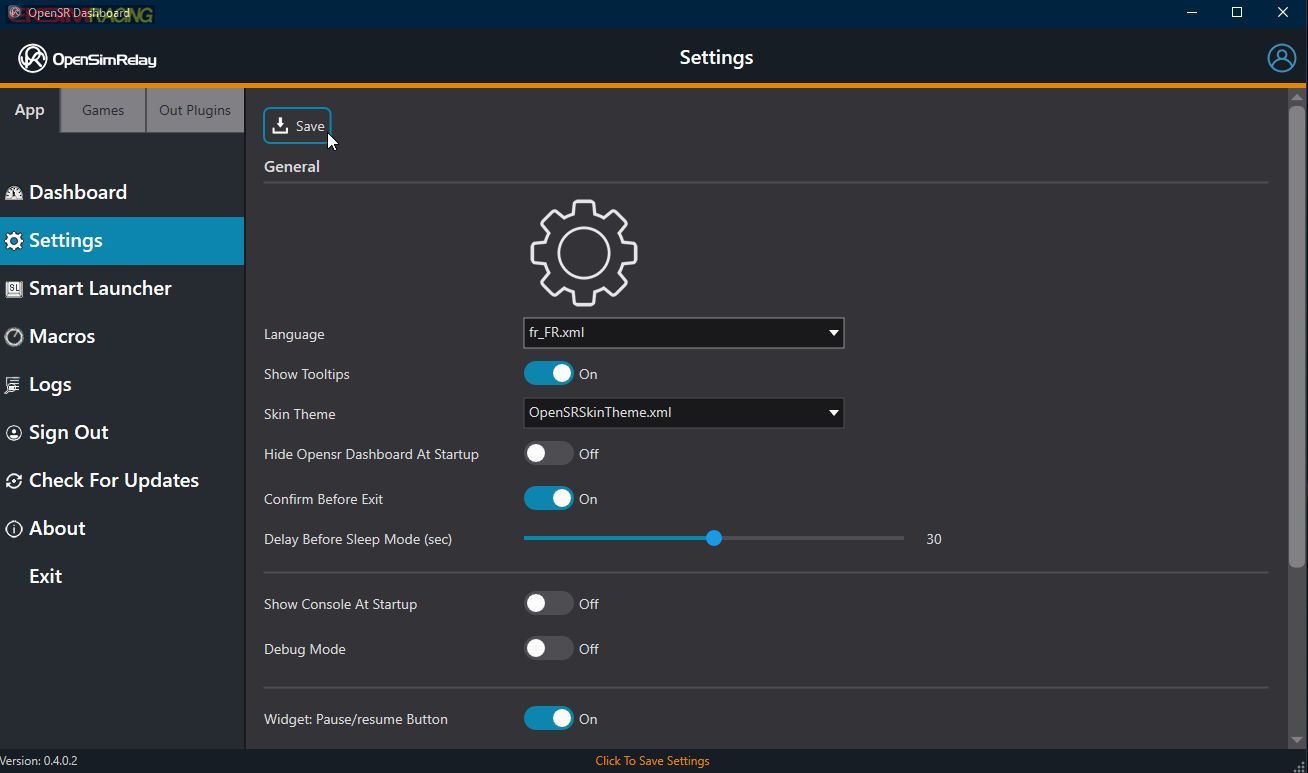
Open the Settings page from the left sidebar.
Select your preferred language.
Save your settings.
B. Sign In to Enable Pro Performance Mode (PPM)
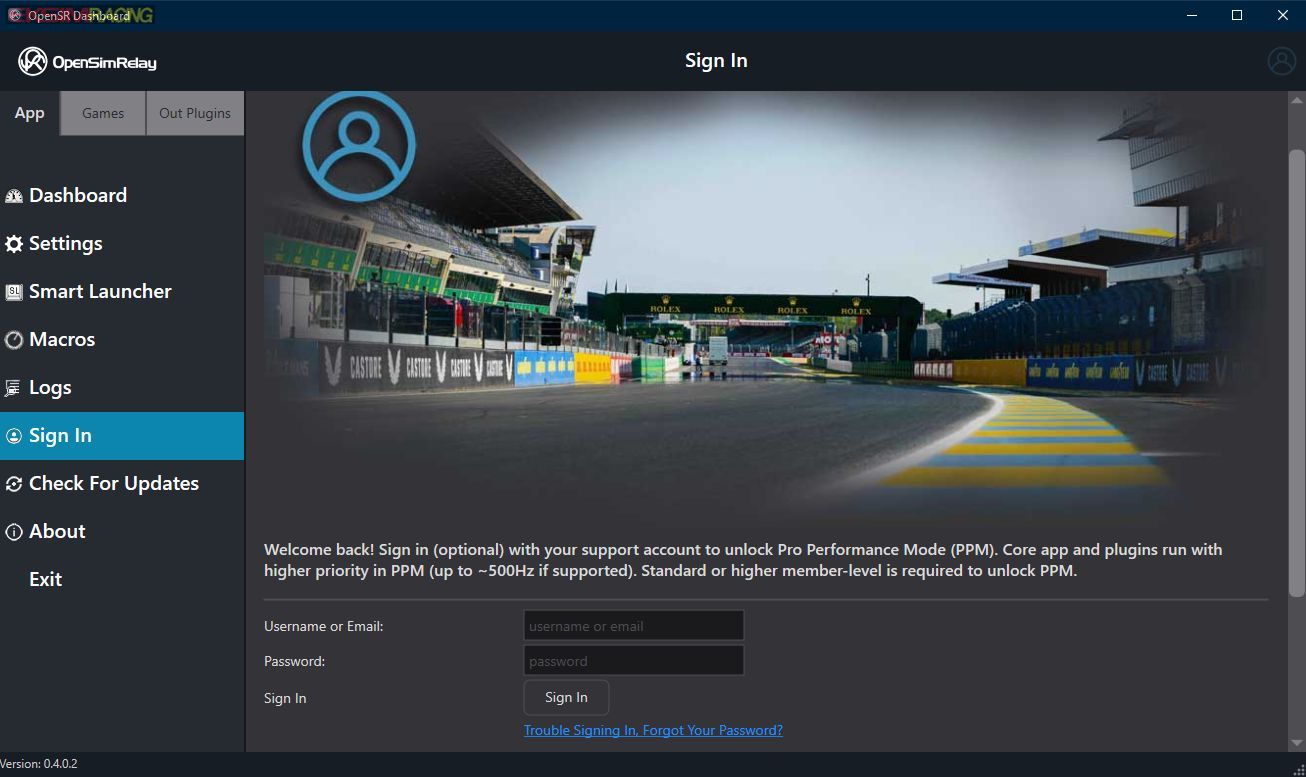
Open the Sign In page.
Enter your account login and password.
To sign in to the OpenSR application, the user must first connect to the support forum at least once. This initial connection is required to validate and activate the account.
By default, OpenSR sends telemetry data at 30 Hz (30 updates per second), which is sufficient for most devices and applications.
Signing in activates Pro Performance Mode (PPM), unlocking telemetry updates at the game’s native rate, typically ranging from 60 Hz to over 500 Hz depending on the simulator.
This feature is our way of rewarding everyone who has supported our projects through donations, contributions, testing, development, and community involvement since 2009.
Thank you all for your continued support. Your contributions help us maintain the project, improve OpenSR, and add support for new hardware and software.
Check For Update
Check For Updates to get the latest version of the apps and plugins.
 Additional Notes
Some game plugins may provide additional settings such as UDP ports, IP addresses, telemetry options, and other game-specific configuration. Refer to the documentation page dedicated to each game plugin for more information.
Some display and device plugins may include additional settings such as:
12-hour or 24-hour time format
Metric or Imperial units
km/h or mph speed display
Device-specific customization options
You’re Ready to Race
That’s it.
You are now ready to use OpenSR with your favorite racing simulator and enjoy your sim racing setup with maximum compatibility and performance.
Join the DiscussionWe would love to hear your feedback.
Visit the OpenSR forum to: Share your thoughts about OpenSR
Report bugs
Suggest improvements
Request new features
Discuss supported hardware and games
Help shape the future of the project
Community feedback is extremely valuable.
Plugin Developers and Hardware Manufacturers
OpenSR was designed from the beginning to be extensible through plugins.
If you are a developer, hardware manufacturer, dashboard application author, or content creator interested in adding support for your products, contact us to obtain access to the OpenSR SDK.
The SDK is currently under active development, just like the OpenSR. It is available on request to registered developers and partners.
The complete public SDK will be released as soon as ready to our
github repository.
