Search The Support Knowledgebase


(database of technical support questions and answers):
   

Author Topic: rFactor2 64bit Plugins Engine

Offline Software Support Staff

  • Management
  • Master Guru
  • *
  • *
  • Posts: 3232
    • eksimracing website
rFactor2 64bit Plugins Engine
« on: December 12, 2011, 07:07:53 AM »
rFactor2 Engine plugin 32/64Bit for rFactor2 Simulation
by Zappadoc

Simulation/Game:
Name: rFactor2
website: rfactor.net studio-397.com

Notes:


Plugin Installation:
- Select menu "Check For Update" to get the latest plugins, read the online doc:
https://www.eksimracing.org/knowledge-base/uncategorized/get-the-latest-plugins-available-and-activate-it/

IMPORTANT:
An rFactor2 bridge dll must be installed in ..rFactor2\Bin64\Plugins\ directory to work

also, the bridge MUST BE ACTIVATED in rFactor 2 PLUGINS/options (see the screenshot below)


The installer will try to install it in default location for you but if it didn't find your rFactor 2 installation you can use Ledsmaster to install it manually. Read the instructions below to install the bridges manually

Ledsmaster:


rFactor 2 Plugins Options:


REMINDER: contact your hardware supplier/manufacturer for hardware issue, this support area is for software assistance only. Read the rules. Thank you.

Offline Software Support Staff

  • Management
  • Master Guru
  • *
  • *
  • Posts: 3232
    • eksimracing website
rFactor 2 64bit brdige installation
« Reply #1 on: July 17, 2014, 02:31:10 PM »
Follow these instructions if you want to install the bridge manually:
Use the helper integrated in Ledsmaster, open the Plugins Manager and click the rFactor2 Plugins Options button or select rFactor2 or Le Mans Ultimate app to copy the bridge in the correct directory:
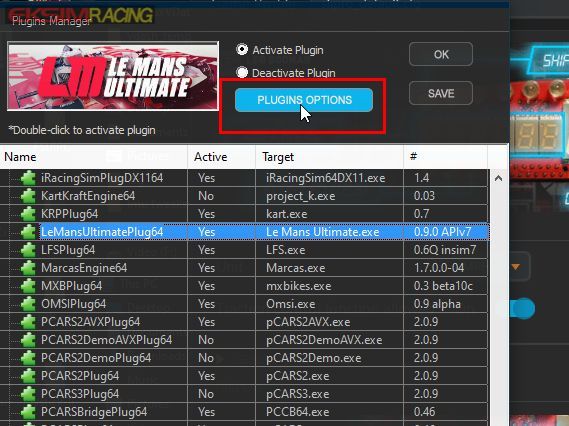


Advanced Information:

rFactor2SLIBridge.dll must be moved to:

C:\Program Files (x86)\steam\steamapps\common\rFactor2\Bin64\Plugins

Attention, the path is different if you have  a Steam version:

Steam\steamapps\common\rFactor 2\Bin64\Plugins\rFactor2SLIBridge_x64.dll

Steam\steamapps\common\Le Mans Ultimate\Plugins\rFactor2SLIBridge_x64.dll
REMINDER: contact your hardware supplier/manufacturer for hardware issue, this support area is for software assistance only. Read the rules. Thank you.

Offline Software Support Staff

  • Management
  • Master Guru
  • *
  • *
  • Posts: 3232
    • eksimracing website
Re: rFactor2 64bit Plugins Engine
« Reply #2 on: February 14, 2024, 10:16:45 AM »
New alternative plugin (rF2 Alt.Motion plugin) available for MotionMax users is out!

These new rFactor 2 plugins for MotionMax 2DOF+TL and MotionMax FREX 6DOF take benefit of our latest research in racing motion forces for a more detailed feedback to the driver. Tested by PRO drivers on 2DOF with Traction Loss motion simulator and FREX 6DOF motion simulator.

A basic game profile is included to get started quickly, this is a good base setup to make your own.

Check For Update to get the latest software and activate the plugin after installation.
Do not forget to deactivate the regular rFactor2 plugin (see the screenshot).
Obviously if you return to the regular rF2 plugin you need to deactivate the Alt.Motion plugin.


REMINDER: contact your hardware supplier/manufacturer for hardware issue, this support area is for software assistance only. Read the rules. Thank you.