R3E Tutorial using the VDASH-EMU ButtonBox:*****************************************************************************************
ATTENTION: Since version 3.4.6.3 of SLIMax Manager Pro the
Virtual To Real (V2R) USB Controller is recommended as it gives you the possibility to use your
VDASH-EMU button Box as A REAL Button-Box! See the
Virtual To Real User Guide for more info...
*****************************************************************************************Here is some steps to
change the Brake Bias on Race Room Racing Experience,
Race Room Racing Experience:open controls settings
set Brake Biais Front = B
set Brake Bias Rear = V
 SLIMax Manager Pro:
0 Open
Advanced Setup Options1 click the VDASHEMU icon on top to select default setup

2 Click the
EXPORT button to create a new setup based on default with the name: vdashemu_bbox_test
3 open the VDASHEMU >
buttons_keys_mapping_list
4
click line 1 for button 1 of the ButtonBox
5 type
V in
Key field
6 click
Key1 button
do the same thing for
line 2 (button 2 of the BBox), type
B, click
Key1 button
then click OK
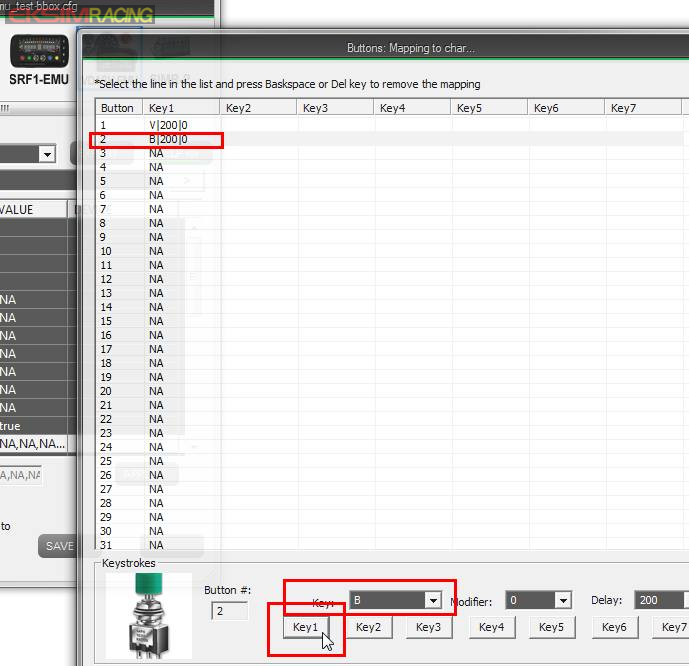
7 click the
APPLY button to confirm your change
8 and
SAVE your setup

9 now
select the new setup named vdashemu_bbox-test
 VDASHEMU ButtonBox
rename button 1 and 2 with B.BIAS - and B.BIAS + and save

that's it!
