The latest version of VDASH-EMU v1.1-32f includes new objects to create cool push buttons, this tutorial is about creating an Ignition and a START/STOP Push Button very easily.
All texture images are from the
ButtonBox Texture Pack which is FREE and available for download in Texture Pack forum. So PLEASE install the pack FIRST before starting this new tutorial.
The new Virtual To Real USB Controller is strongly recommended which let you use your virtual buttonbox controls like a real button-box, check the info about V2R
HERE1a) Create the START/STOP Push Button:- enter EDITOR Mode

- go to a fresh new page of VDASH-EMU and select menu
MISC > Ctrl Image PushButton- this object ask you to choose the UP image and then the DOWN image to create a push button


So select the buttonbox_pack (this texture pack should be already installed if you follow the instructions of this tuto correctly) and choose the "engine_start_up.png" image and after the "engine_start_down.png" image
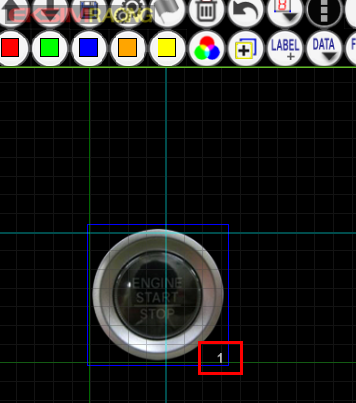
ok, now you have the PushButton on your page assigned to button index 1 and it can be already tested, just exit the EDITOR mode and push it, it works!
1b) Optional: Create the Ignition Switch- enter the EDITOR mode

- Do the same thing as for the START/STOP button, use the
Ctrl Image PushButton and choose the "
switch_button_up.png" and than the "
switch_button_down.png" this time

- edit the properties of the object and change the button index to 2
Congrats ! now you have to fully functional PushButtons ready to use.
2) Using the Pushbuttons with EKSIMRacing V2R USB Controller
- if you have the
EKSIMRacing V2R USB Controller connected, you can go directly to your game controls settings and assign these new buttons the STARTER and Ignition functions
Notes: if you do not have the EKSIMRacing V2R USB Controller you have to assign a keyboard key to button 1 and 2 in SLIMax Mgr Pro setup and the same keys on game settings to control the ignition and starter function, check the other tutorials to learn how to do it.
rFactor 2 Controls Settings:RaceRoom Racing Experience (R3E) Controls SettingsProject CARS 1Project CARS 2 Controls SettingsSimbin GTR 2 Controls SettingsReiza Automobilista Controls Settings
Your PushButtons can control all games or simulations using the Ignition/Starter functions.
See next post to learn how to illuminate your START/STOP button......
