Search The Support Knowledgebase


(database of technical support questions and answers):
   

Author Topic: VDASH-EMU ButtonBox with Project CARS Game

Offline zappadoc

  • Management
  • Suppreme Master Sensei
  • *
  • *
  • *
  • Posts: 5758
  • No email or PM support
    • ZDoc Dev Blog
VDASH-EMU ButtonBox with Project CARS Game
« on: March 29, 2016, 08:58:33 PM »
BUTTONBOX FOR PROJECT CARS:


*****************************************************************************************

ATTENTION:
Since version 3.4.6.3 of SLIMax Manager Pro the Virtual To Real (V2R) USB Controller
is recommended as it gives you the possibility to use your VDASH-EMU button Box as A REAL Button-Box!
See the Virtual To Real User Guide for more info...


*****************************************************************************************


Following the tutorial of a ButonBox For iRacing simulation here:

https://www.eksimracing.org/forum/index.php?topic=3204.0

who lets you learn how to design a button box for any game or simulation (recommended to read it first), here an example for Project CARS.

As for iRacing we start by designing the buttonbox with all wanted features

Notice that this tutorial is less specific than the iRacing ButtonBox tutorial, refer to the iRacing tuto for more info on each step if needed.

Notes: the 3 switches and the last encoder are not used.


No support will be provided by PM or EMAIL, PM has been disabled due to heavy spam and abuse, please post in the support boards, thanks for your understanding.

Offline zappadoc

  • Management
  • Suppreme Master Sensei
  • *
  • *
  • *
  • Posts: 5758
  • No email or PM support
    • ZDoc Dev Blog
Re: VDASH-EMU ButtonBox with Project CARS Game
« Reply #1 on: March 29, 2016, 09:01:38 PM »
Now we have designed the buttonbox, we need to enter the keyboard key for each function in Project CARS CONTROLS settings:


No support will be provided by PM or EMAIL, PM has been disabled due to heavy spam and abuse, please post in the support boards, thanks for your understanding.

Offline zappadoc

  • Management
  • Suppreme Master Sensei
  • *
  • *
  • *
  • Posts: 5758
  • No email or PM support
    • ZDoc Dev Blog
Re: VDASH-EMU ButtonBox with Project CARS Game
« Reply #2 on: March 29, 2016, 09:06:38 PM »
We need to create an SLIMax Mgr Pro setup for Project CARS and enter the MACROs (sequence of keystrokes) to trigger the corresponding game functions:

IMPORTANT: the mapping keys in the setup could be different with international keyboard, some adjustment might be require to match the Project CARS settings and some key will not work at all. The SLIMax Mgr Pro setup can also handle VKEY code instead of char (type the VKEY code in Key field). Check the VKEY list here. I suggest to avoid using Z/W/A/Q/M on azerty keyboard. ;)

Like for iRacing tutorial we have selected the vdashemu_project_cars setup and clicked the button EXPORT to create a custom setup named vdashemu_project_cars_bbox
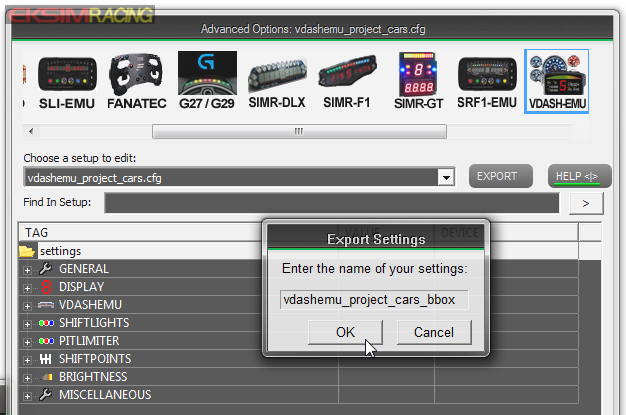


and then enter the keyb keys in buttons_keys_mapping_list accordingly to the controls layout of the VDASH-EMU buttonbox:

Go to EDITOR MODE to display the control index:


Set the mapping button to true:
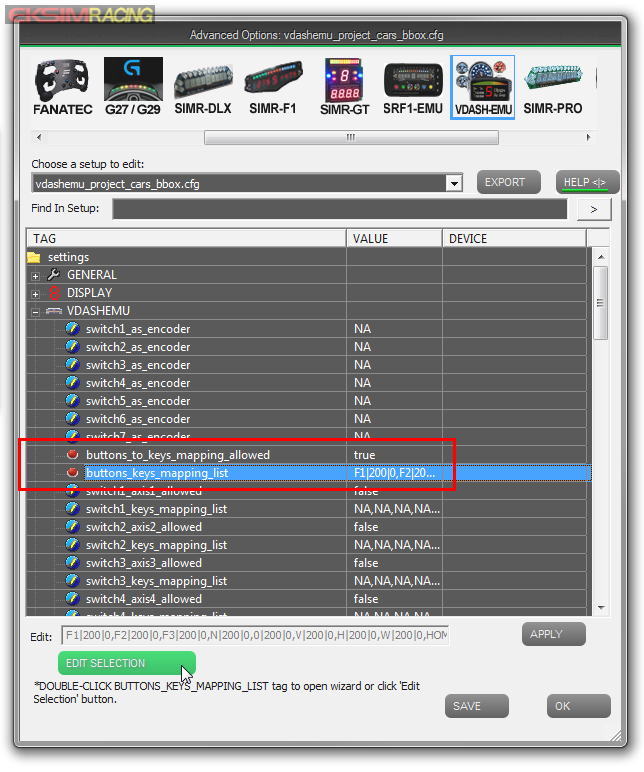

Edit keystrokes:


then we select the new setup to activate it!
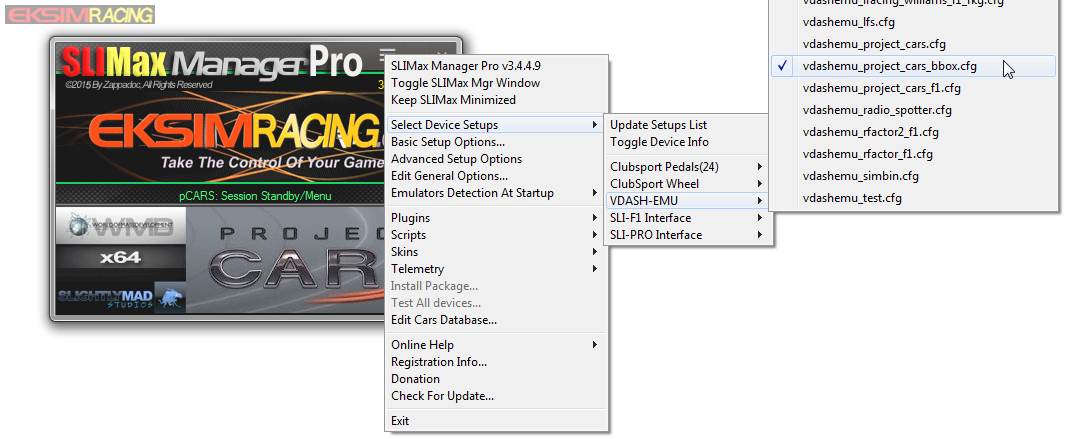


.
No support will be provided by PM or EMAIL, PM has been disabled due to heavy spam and abuse, please post in the support boards, thanks for your understanding.

Offline zappadoc

  • Management
  • Suppreme Master Sensei
  • *
  • *
  • *
  • Posts: 5758
  • No email or PM support
    • ZDoc Dev Blog
Re: VDASH-EMU ButtonBox with Project CARS Game
« Reply #3 on: March 29, 2016, 09:09:56 PM »
Congrats! you are now ready to go on track and test your amazing buttonbox!!! :)

Cheers,
z


Files of this tutorial:

VDASH-EMU ButtonBox Templates: 
drop the file template_buttonbox.json into the /vdash_template directory (see the sticky if you don't know where is your vdash_template directory)

SLIMax Mgr Pro VDASH-EMU Project CARS Setup:
copy vdashemu_project_cars_bbox.cfg into  C:\SLIMax Manager\cfg\ directory

.

No support will be provided by PM or EMAIL, PM has been disabled due to heavy spam and abuse, please post in the support boards, thanks for your understanding.

Offline zappadoc

  • Management
  • Suppreme Master Sensei
  • *
  • *
  • *
  • Posts: 5758
  • No email or PM support
    • ZDoc Dev Blog
Re: VDASH-EMU ButtonBox with Project CARS Game
« Reply #4 on: March 31, 2016, 04:25:50 PM »
In latest version of VDASH-EMU (v1.1-11 ) you can simply load any buttonbox layout file from menu "Set ButtonBox..." and also Export your custom BBox and share it with us a preview is automatically done. Here is the preview + buttonbox layout for the latest version.

Just drop both files into templates or exported directory and then use Set ButtonBox menu to install it automatically.

DO NOT FORGET TO UPDATE VDASH-EMU before
;)

No support will be provided by PM or EMAIL, PM has been disabled due to heavy spam and abuse, please post in the support boards, thanks for your understanding.