

Any Game In. Any Hardware Out. The open platform that connects your sim racing hardware to every game.
Open Sim Relay (OpenSR), the successor to Ledsmaster, a 100% free and open-platform middleware designed to bridge applications that send data or telemetry (such as games) to motion simulators, robotic systems, sim racing hardware, steering wheels, digital dashboards, leaderboard systems, telemetry applications, mobile devices (Android, iOS), IoT systems, USB devices, and more. Still using Ledsmaster? Upgrade to OpenSR today for a completely free and open-platform experience.
OpenSR provides a flexible, plugin-based architecture that collects telemetry from IN (Source) plugins and relays it to OUT (Destination) plugins.
It is designed for sim racers, telemetry enthusiasts, hardware developers, or anyone who wants to connect virtual data to real-world systems in a fully adaptable way.
OpenSR is the new free application that replaces everything I have developed for the sim racing community since 2007. You could say this is my legacy project. No licenses, no activation fees, no paid versions. OpenSR is free for everyone.
Cheers!
Zappadoc


Status: OpenSR Available For Download
Key Features


- Modular Plugin System: Two plugin types: IN plugins capture telemetry from games or applications, OUT plugins send processed data to hardware, dashboards, motion systems, or any external target.
- Built-in Dashboard: Central interface to manage Smart Launcher automation, enable or disable plugins, manage per plugin settings, and handle game profiles.
- Smart Launcher: Event based automation system to launch programs or scripts on button press, key input, or game start.
- Macros: Integrated macro system to simulate keystroke on button/encoder press or on using rotary switch,
- Arduino Projects: New integrated Arduino Project, making it easier to build your own custom RGB LED and input controllers.
- Game and Device Plugins: Support for major games and a wide range of hardware including Thrustmaster, Fanatec, Leo Bodnar SLI display devices, SIM Display display devices, VDASH-EMU digital dashboard, Vocore LCD, Stream Deck and more.
- Built-in Flexible Configuration System: Each plugin manages its own optional configuration using XML, JSON, INI, or custom DLL based settings.
- Shared Memory Core: Lightweight communication layer between plugins and external applications.
- Shared Blob Data: Custom data exchange space for advanced or experimental integrations without modifying the core.
- Hot Plug Support: Devices can be connected or disconnected at runtime, even during a live game session, without restarting the server or the game.
- Developer SDK: Headers, tools, and full source sample plugins to build additional IN and OUT integrations.

Use Cases
- Forward racing game telemetry to motion platforms, dashboards, or custom hardware.
- Connect multiple external devices to enhance immersion in games.
- Monitor and log real-time data for analysis and performance improvement.
- Develop plugins for custom hardware, protocols, or systems.
Architecture
- OpenSR Server: The core relay handling memory & plugin lifecycle.
- IN Plugins: Input sources (games or custom app).
- Out Plugins: Output destination (device, network, monitoring, dash, app, etc.).
- OpenSR Plugins Interface: Shared headers and SDK for plugin developers.
Why OpenSR?
Unlike monolithic tools, OpenSR is lightweight, modular, optimized, and extensible. Developers can write plugins with minimal boilerplate, while users benefit from an open ecosystem where telemetry can be routed anywhere.
OpenSR also builds on more than 15 years of experience (since 2008) in bridging games, hardware, and display systems. Users benefit from this expertise as we continue to serve the community with a free, open, and evolving project.
FAQ
General Questions
What is Open Sim Relay (OpenSR)?
A 100% free and open-platform middleware designed to bridge applications that send data or telemetry (such as games or custom apps) to motion simulators, robotic systems, sim racing hardware, steering wheels, digital dashboards, leaderboard systems, telemetry applications, mobile devices (Android, iOS), IoT systems, USB devices, and more. It captures data from supported games (via IN plugins) and relays it to Out plugins.
Is OpenSR free?
Yes. OpenSR is free to use (no license or registration needed). The core application is distributed as a closed but freely available binary, while plugins can be open-source or proprietary depending on each developer’s choice. The free version operates at up to 30 Hz update rate, which is enough for normal usage and most hardware setups. Pro Performance Mode (higher update rates 500+ Hz) is available as a thank-you to donors who help the project. Sign in within the app to access PPM.
Which games are supported?
Any game can be supported by writing a dedicated Game plugin. OpenSR will support a wide range of major racing titles, including but not limited to:
American Truck Simulator
Assetto Corsa Pro**
Assetto Corsa
Assetto Corsa Competizione
Assetto Corsa EVO
Assetto Corsa Rally
Automobilista 2
BeamNG Drive
DCS Motion
DiRT4
DiRT Rally
DiRT Rally 2.0
EA F1 22
EA F1 23
EA F1 24
EA F1 25
EA Grid Legends
EA SPORTS WRC 2023
Euro Truck Simulator 2
F1 2010
F1 2011
F1 2012
F1 2013
F1 2014
F1 2015
F1 2016
F1 2017
F1 2018
F1 2019
F1 2020
F1 2021
Forza Horizon 4
Forza Horizon 5
Forza Horizon 6
Forza Motorsport 2023
GRID Autosport
GRID2
GT Legends
GTR2
iRacing
KartKraft
Le Mans Ultimate
Live For Speed
GRally*
GP Bikes*
Kart Racing Pro
MX Bikes
Project CARS
Project CARS 2
Project CARS 3*
Project Motor Racing
RaceRoom Racing Experience
rFactor
rFactor Pro**
rFactor 2
Richard Burns Rally
WRC Generations
Wreckfest 2
** special version for PRO available on demand, contact us.
What are the system requirements for OpenSR?
OpenSR is designed to be extremely lightweight, the core relay itself typically uses under 1% CPU and only a few megabytes of memory.
Actual resource usage may vary depending on the plugins you load, as each plugin manages its own processing independently.
- Operating System: Windows 10 or Windows 11 (64-bit)
- CPU: Any modern x64 processor
- Memory: Minimal (a few MBs for shared buffers and plugins)
- Storage: Only a few megabytes required for the core and plugin folders
OpenSR is designed to run quietly in the background without impacting your game performance.
What can I connect OpenSR to?
Almost anything! Dashboards app, leaderboard app, motion simulator platforms, LEDs, displays, data loggers, Arduino/ESP devices, robots, or even hardware with custom network protocols.
Functionality & Architecture
How does OpenSR work?
OpenSR uses a core relay server that hosts shared memory structures.
- Game plugins push telemetry into the core.
- Out plugins read and forward it wherever you want.
It’s fast, lightweight, and designed to run quietly in the background.
What is a “plugin” in OpenSR?
A plugin is a dynamic module (DLL) that extends OpenSR.
- Game Plugins bring data in.
- Out Plugins send data out.
Each lives in its own folder with optional settings and resources.
How do I configure plugins?
Each plugin’s folder can contain:
- settings.xml or settings.dll for configuration
- Or any custom settings format (JSON, INI, etc.)
Developers are free to manage settings in their preferred format.
Usage & Integration
Does OpenSR support running multiple plugins at once?
Yes. You can run one Game plugin and multiple Out plugins simultaneously, for example, sending telemetry both to a dashboard and to a motion platform.
Can OpenSR run multiple games at once?
No. OpenSR is designed to handle one active game at a time, but it can support any game, depending on the plugin loaded.
Does it require admin privileges?
Only if a specific plugin does. The core itself runs as a normal user process.
Can I use OpenSR with custom hardware or drones or robots?
Yes. OpenSR isn’t limited to game telemetry, it features two shared data channels:
- a structured telemetry buffer for game data, and
- a generic blob buffer (32 KB) for any custom or non-standard data.
This blob channel lets plugins exchange any kind of information, making OpenSR ideal for custom hardware, IoT systems, drones, robots, or experimental prototypes. If your application can produce or consume data, OpenSR can relay it.
Development & Customization
Can I create my own plugin?
Yes. OpenSR provides clean C++ headers and interfaces in OpenSR Plugins Interface/.
You can build a new plugin using Visual Studio 2015 or later, with minimal dependencies. You can write Game (IN) or Out plugins; C++ is the recommended/native option (OpenSR exposes the native interfaces IOpenSRPlugin and IOpenSROutPlugin), but you are not limited to C++. Plugins can be authored in any language by using a wrapper or interop layer C#, Python, Java, etc. are all possible.
The SDK provides: sample headers and C++ templates, plus example wrappers/templates to help you build plugins in managed or scripted languages. Build the plugin into its folder with optional settings (XML/JSON/INI or settings.dll), drop it into the appropriate game Plugins/ or OutPlugins/ directory, and the core will load it.
Can I use my own configuration format or UI for settings?
Absolutely. OpenSR natively manages a settings.xml file associated with each plugin, which allows basic configuration out of the box. However, developers can go further using the SDK to create their own custom settings UI (settings.dll) or use any configuration format they prefer such as JSON, INI, or even a database.
This flexibility lets each plugin define its own configuration workflow and user interface while still integrating seamlessly into the OpenSR plugin management system.
Community & Contribution
Where can I get plugins or share my own?
Community plugins will be listed on the project’s GitHub and future OpenSR forum. Developers can easily share precompiled plugins or source code.
How can I contribute to OpenSR?
- Developers can help by building new plugins or improving existing ones.
- Enthusiasts and testers can share feedback, test new versions, and suggest ideas for future features.
- Supporters who simply love the project can also donate to help us acquire more hardware, devices, and games for testing, every bit helps make OpenSR more compatible and reliable for everyone.
Every contribution counts, and being part of OpenSR means shaping a tool that connects virtual worlds to the real one.
Quick Guide
OpenSR
OpenSR is available now!
The current devices supported by OpenSR (2026-09):
Leo Bodnar Shift-Lights Interface (SLI)
USB Shift lights Interface ( SLI-F1, SLI-PRO, SLI-M and SLI-FTEC – Fanatec USB Rim Conversion Kit)
Thrustmaster
TS-PC Racer Ferrari 488 Challenge Edition
Fanatec rim
The software manages all Fanatec hardware supported by the version 4.06 of the official Fanatec SDK.
VDASH-EMU Sim Racing Digital Dash. VDASH-EMU Android/Windows sim racing digital dash. VDASH-EMU For Windows includes the native support of VoCore screens and STREAM DECK.
SimDisplay Sim Racing Devices
SIM RACE LCD, SIM RACE F1, SIM RACE Deluxe or SIM RACE PRO USB Shift lights Display devices from SIM Display
Steelseries
SRW-S1 steering wheel
VoCore
USB Screen 4″, 4.3″, 5″, 6.8″ and Round as backend of VDASH-EMU For Windows
STREAM DECK (standalone mode)
MK2 and XL v1/v2 as backend of VDASH-EMU For Windows
V2R Controller Based On Adafruit Trinket M0
15 RPM LEDs, 6 FLAG LEDs supported as backend of VDASH-EMU For Windows
AMC Thanos Controller
OpenSR now supports the AMC Thanos motion controller as a backend of 3DOF Motion Simulator plugin (still a w.i.p….), enabling direct control of compatible motion platforms with low-latency telemetry and seamless integration through the OpenSR plugin system.
Arduino Compatible Boards:
SparkFun Pro Micro (32u4)
Raspberry Pi Pico
Raspberry Pi Pico W
Raspberry Pi Pico 2
Raspberry Pi Pico 2 W
Arduino Micro
Arduino Leonardo
Freenove ESP32-S3 VROOM-1
Waveshare ESP32-S3 DevKitC-1
Seeed Studio XIAO ESP32-S3
Adafruit Trinket M0
Adafruit ItsyBitsy M0
Adafruit ItsyBitsy M4
In addition to supporting USB devices and displays, OpenSR also have a native support of VDASH-EMU for Android and Windows.
More devices and apps will be supported. Check the supported devices and applications list on the website for the latest compatibility information.
Quick Getting Started Guide
OpenSR is designed to be simple and easy to use. Follow these three steps to get started quickly.
Step 1 – Download and Install
Download the latest full installer and install OpenSR.
Step 2 – Allow OpenSR Through Windows Firewall
When launching OpenSR for the first time, Windows may display a firewall security prompt.
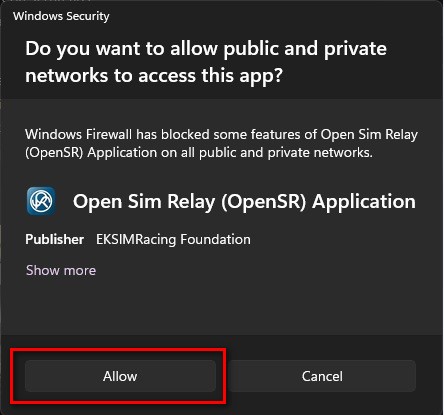
Click “Allow Access” to let OpenSR communicate with its components and plugins. Some plugins use local network communication to exchange data with dashboard applications and external devices.
Step 3 – Recommended Initial Configuration
Before going on track with your favorite game, we recommend the following setup:
A. Select Your Language
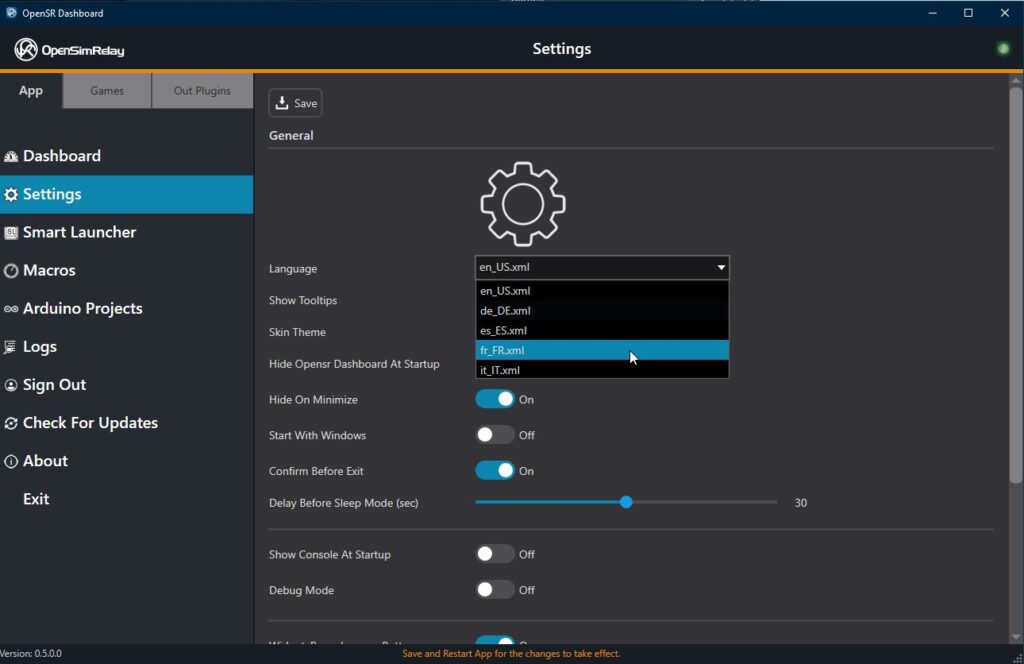
- Open the Settings page from the left sidebar.
- Select your preferred language.
- Save your settings.
B. Sign In to Enable Pro Performance Mode (PPM)

- Open the Sign In page.
- Enter your account login and password.
To sign in to the OpenSR application, the user must first connect to the support forum at least once. This initial connection is required to validate and activate the account.
By default, OpenSR sends telemetry data at 30 Hz (30 updates per second), which is sufficient for most devices and applications.
Signing in activates Pro Performance Mode (PPM), unlocking telemetry updates at the game’s native rate, typically ranging from 60 Hz to over 500 Hz depending on the simulator.
This feature is our way of rewarding everyone who has supported our projects through donations, contributions, testing, development, and community involvement since 2009.
Thank you all for your continued support. Your contributions help us maintain the project, improve OpenSR, and add support for new hardware and software.
Additional Notes
- Some game plugins may provide additional settings such as UDP ports, IP addresses, telemetry options, and other game-specific configuration. Refer to the documentation page dedicated to each game plugin for more information.
- Some display and device plugins may include additional settings such as:
- 12-hour or 24-hour time format
- Metric or Imperial units
- km/h or mph speed display
- Device-specific customization options
You’re Ready to Race
That’s it.
You are now ready to use OpenSR with your favorite racing simulator and enjoy your sim racing setup with maximum compatibility and performance.
Plugin Developers and Hardware Manufacturers
OpenSR was designed from the beginning to be extensible through plugins.
If you are a developer, hardware manufacturer, dashboard application author, or content creator interested in adding support for your products, the SDK has been released on our Github repository.
OpenSR Licenses
License (Abstract)
End User License Agreement (OpenSR License)
for Open Sim Relay (OpenSR)
Copyright (c) 2025-2026 by Zappadoc and EKSIMRacing Foundation. All rights reserved.
1. Definitions
- “Core Software” means the Open Sim Relay (OpenSR) core system, including its binaries, executables, libraries, documentation, and all related elements provided by Zappadoc and/or EKSIMRacing Foundation.
- “Extension Software” means external modules designed to work with the Core Software, including but not limited to “IN (Game) Plugins” and “OUT Plugins,” whether created by Zappadoc , EKSIMRacing Foundation, or third parties.
- “You” or “End User” means the individual or entity installing or using the Core Software.
- “Commercial Use” means any use of the Core Software for profit-generating activities, professional services, or business operations. This includes, but is not limited to: use within commercial sim racing centers, promotional demonstrations at exhibitions or trade shows, using the software to promote or sell hardware products, or incorporating the Core Software into a commercial software solution or service.
2. License Grant
The Core Software is licensed, not sold.
You are granted a personal, non-exclusive, non-transferable right to install and use the Core Software in binary form only.
This license is granted free of charge for personal and non-commercial use only. Any use of the Core Software that falls under the definition of “Commercial Use” (as defined in Section 1) requires a separate written license agreement. Please contact us for details.
3. Restrictions on the Core Software
Unless expressly authorized in writing by Zappadoc and/or EKSIMRacing Foundation, you may not:
- Reverse engineer, decompile, or disassemble the Core Software.
- Modify, adapt, translate, or create derivative works of the Core Software.
- Redistribute, publish, or share the Core Software binaries.
- Sell, rent, lease, sublicense, or otherwise commercially exploit the Core Software.
4. Extension Software
- Extension Software may be developed and distributed independently by third parties.
- Developers of Extension Software retain full ownership and copyright of their work.
- Extension Software may be released under any license chosen by its author (including open source, proprietary, commercial, or free).
- The Core Software imposes no licensing restrictions on Extension Software.
- Extension Software must not interfere with the proper functioning of the Core Software or violate the terms of this Agreement.
While Extension Software may be released under any license chosen by its author, such licenses must not conflict with the terms of this Agreement regarding the use of the Core Software.
5. Updates and Termination
- Zappadoc and/or EKSIMRacing Foundation may, at their discretion, provide updates, patches, or modifications to the Core Software.
- This license will terminate automatically if you breach any of its terms.
- Upon termination, you must cease all use of the Core Software and destroy all copies in your possession.
6. Ownership
The Core Software, including all associated intellectual property rights, remains the sole property of Zappadoc and EKSIMRacing Foundation.
No ownership rights are transferred to you under this Agreement.
Extension Software developed by third parties remains the sole property of its respective authors, who may distribute it under their chosen license terms.
7. Disclaimer of Warranty
The Core Software is provided “AS IS,” without warranty of any kind, express or implied, including but not limited to warranties of merchantability, fitness for a particular purpose, or non-infringement.
You assume all risks associated with the use of the Core Software.
8. Limitation of Liability
In no event shall Zappadoc , EKSIMRacing Foundation, or the author(s) be liable for any damages arising out of or related to the use or inability to use the Core Software, including but not limited to:
- Data loss
- Business interruption
- Loss of profits
- System failure or malfunction
Even if advised of the possibility of such damages.
9. Contact
For commercial licensing, permissions, or other inquiries, please contact us.
License Agreement: OpenSR 3DOF Motion Simulator Plugin
Including support for UDP Motion Platform Bridges and Thanos AMC Motion Controller
Copyright © 2025-2026 by Zappadoc and EKSIMRacing Foundation. All rights reserved.
IMPORTANT: READ CAREFULLY BEFORE USE
By installing or using this plugin, you acknowledge that you have read, understood, and agreed to the terms and conditions below.
1. Relationship to OpenSR Core
This software is an Extension Software (Plugin) designed specifically for use with Open Sim Relay (OpenSR) eksimracing.org.
- The use of this plugin is subject to the OpenSR End User License Agreement (OpenSR License) eksimracing.org.
- The OpenSR Core is proprietary software licensed separately by Zappadoc/EKSIMRacing Foundation eksimracing.org.
2. Health and Safety Warning (CRITICAL)
MOTION SIMULATORS INVOLVE PHYSICAL MOVEMENT AND REAL-WORLD RISKS.
You fully understand and acknowledge that the use of motion simulator hardware involves inherent risks and dangers of serious bodily injury, including but not limited to:
- Permanent disability
- Paralysis
- Death
YOU MUST READ AND STRICTLY FOLLOW ALL HEALTH AND SAFETY PRECAUTIONS PROVIDED BY YOUR HARDWARE MANUFACTURER. It is your sole responsibility to ensure that your motion platform is installed correctly, secured, and used within safe operational limits.
3. Disclaimer of Warranty
This plugin is provided “AS IS,” without warranty of any kind, express or implied. This includes, but is not limited to, the implied warranties of merchantability and fitness for a particular purpose.
The authors make no guarantees regarding the accuracy of the telemetry data sent via UDP or the precise movement of the Thanos AMC Motion Controller or any other motion platform. You assume all risks associated with the use of this software.
4. Limitation of Liability
In no event shall Zappadoc, EKSIMRacing Foundation, or the contributors be liable for any direct, indirect, incidental, special, exemplary, or consequential damages arising out of the use of this plugin.
This includes, but is not limited to:
- Physical injury or death resulting from hardware malfunction or software error.
- Hardware damage to motion platforms, actuators, or computers.
- Data loss, business interruption, or loss of profits.
This limitation applies regardless of whether the claim is based on contract, strict liability, or tort (including negligence), even if the authors were advised of the possibility of such damages.
5. Use and Distribution
This plugin is provided for personal, non-commercial use. Any use of this plugin within a commercial environment (e.g., commercial sim racing centers, trade shows, or as part of a paid hardware bundle) requires a separate written agreement from Zappadoc and/or EKSIMRacing Foundation eksimracing.org.
By using this plugin, you agree to these terms and conditions.
Plugin License (Template)
Plugin Developer License Notice (Template)
[Plugin Name] for Open Sim Relay (OpenSR)
Copyright (c) [Year] [Author/Organization]

This plugin is an Extension Software for use with the Open Sim Relay (OpenSR) Core.
The OpenSR Core is proprietary software licensed separately by Zappadoc/ EKSIMRacing Foundation.
This plugin is licensed under the following terms:

[Insert license choice here, e.g. MIT, GPLv3, proprietary license text, or custom terms]

Note: The license for this plugin must remain compatible with the OpenSR End User License Agreement (OpenSR License).
See https://www.eksimracing.org/opensr for details.
Plugin License (Example)
Example of License for OpenSR Plugins
[Plugin Name] for Open Sim Relay (OpenSR)
Copyright (c) [Year] [Author/Organization]

Permission is hereby granted, free of charge, to any person obtaining a copy of this
plugin (the "Extension Software") and associated documentation files, to use, copy,
modify, merge, publish, distribute, sub-license, and/or sell copies of the Extension
Software, subject to the following conditions:

1. The above copyright notice and this permission notice shall be included in all
   copies or substantial portions of the Extension Software.

2. This license applies only to the Extension Software. The Open Sim Relay (OpenSR)
   Core Software is proprietary software licensed separately by Zappadoc / EKSIMRacing Foundation.
   Nothing in this license grants rights to the OpenSR Core.

3. The Extension Software must remain compatible with the OpenSR End User License
   Agreement (OpenSR License). See https://www.eksimracing.org/opensr for details.

THE EXTENSION SOFTWARE IS PROVIDED "AS IS", WITHOUT WARRANTY OF ANY KIND, EXPRESS
OR IMPLIED, INCLUDING BUT NOT LIMITED TO THE WARRANTIES OF MERCHANTABILITY,
FITNESS FOR A PARTICULAR PURPOSE AND NONINFRINGEMENT. IN NO EVENT SHALL THE
AUTHORS OR COPYRIGHT HOLDERS BE LIABLE FOR ANY CLAIM, DAMAGES OR OTHER LIABILITY,
WHETHER IN AN ACTION OF CONTRACT, TORT OR OTHERWISE, ARISING FROM, OUT OF OR IN
CONNECTION WITH THE EXTENSION SOFTWARE OR THE USE OR OTHER DEALINGS IN THE
EXTENSION SOFTWARE.
Support
Users or developers can check EKSIMRacing forum to get assistance. A quick guide to OpenSR SDK is also available.
Join the Discussion
We would love to hear your feedback. Visit the OpenSR forum to:
- Share your thoughts about OpenSR
- Report bugs
- Suggest improvements
- Request new features
- Discuss supported hardware and games
- Help shape the future of the project