
NOTES
– VDASH-EMU For Android can be used on 4 devices (a valid license of each device is required),
– Only one instance* of VDASH-EMU For Windows per PC/Tablet (up to 4 PC running the emu on your network at the same time, a valid license of each EMU is required),
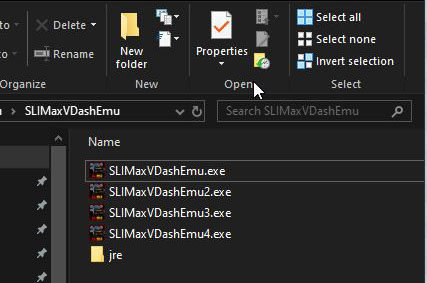
*duplicate the app (see the screenshot below) and configure the UDP port of each app to use more than one VDASH-EMU For Windows on the same PC
– some data (telemetry) stay at ZERO, why?
because the data are from the API of game and they simply didn’t provide the information you want to display. All telemetry data managed by VDASH-EMU including delta time are NOT AVAILABLE in ALL games, it depends the level of data provided by the API of the game.
– VDASH-EMU like other emulator works only in landscape or reverse landscape mode
– YOU CAN’T USE THE BUTTONBOX or any control created on custom page if you run VDASH-EMU on the same PC where the game runs. This is NORMAL as by clicking on the control you automatically exit the context of the game. Obviously, you can register and install the Windows version of VDASH-EMU on another PC or Laptop or Windows tablet connected on LAN Network. to use the button-box.
– the virtual button-box integrated in the VDASH-EMU can’t be used on Console version for a simple and obvious reason, the OpenSR app can’t send a simulated keystroke (keyboard key) across the network to drive the game running on console.
Check this quick overview video of VDASH-EMU v1.1-35 Preview using the editor mode and the Drag & Drop features: