
V2RBox Server:
A PC with Windows OS from 7 to 11 for the V2RBox server wired connected to your local network (with Internet access)
V2RButtonBox:
Large and DEDICATED Android or Window tablet connected to your LAN network with WIFI. Android tablet is recommended.
USB V2RBox Controller:
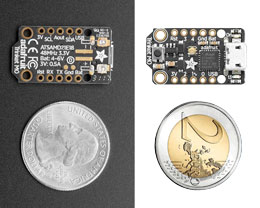
1 or more V2RBOX Controller based on Trinket M0 device from Adafruit ($9 USD)

Also compatible with the Teensy LC board from PJRC
A Tablet Is Recommended
The V2RButtonBox emulator can obviously run on your main PC but we strongly recommend to use a large Android or Windows tablet to be able to place the virtual machine near your rig and to mach the common size of real Button-Box device a 8″ or greater tablet is recommended for the virtual button-box.
The V2RBox Server runs in background on your main PC and bridge the USB V2RBOX Controller with your Android or Windows tablet to communicate with your game using buttons and axes.
Screen Ratio Info
16:10 (8:5) is the most common screen ratio available on tablet, however keep in mind that a 4:3 ratio will give you almost 1/3 of additional space for your custom V2R virtual machines. Native resolution is also available to work with large multi touch monitor.