
1. Overview
profile_template.xml is the normalized configuration template used by OUT plugins that require per-game user customization.
Typical use cases:
- hardware devices (LEDs, displays, controllers)
- dashboards / overlays
- telemetry-driven UI systems
2. Purpose
The template serves three roles simultaneously:
1. Default configuration
- Acts as the base profile
- Used when:
- creating a new profile
- initializing autosetup
2. Schema definition
- Defines:
- available options
- data types
- constraints
- Ensures consistency across all profiles
3. UI description
- Drives how the dashboard renders the configuration UI:
- sliders
- dropdowns
- text fields
- images
- flags, colors, etc.
3. Ownership & Processing
Parsed by:
- Host / Dashboard only
Not parsed by:
- Plugins directly (they consume the result)
Host responsibilities:
- Interpret XML
- Generate UI dynamically
- Manage:
- create / clone / delete profiles
- autosetup
- persistence
4. Template Location
Inside the OUT plugin folder:
<OutPlugins>/
  <OutPluginName>/
    profile_template.xml
Default asset root:
- Relative paths are resolved from:
- the plugin folder
Example:
<option name="sli-pro panels" type="image">slipro_panels.png</option>

or better if the image is in an asset folder inside the plugin folder:

<option name="sli-pro panels" type="image">assets/slipro_panels.png</option>
5. XML Structure
Example for SLI-PRO display device:
<?xml version="1.0" encoding="utf-8"?>
<settings info="sli-pro device default settings" version="1" type="template">
    <general>
        <gear>
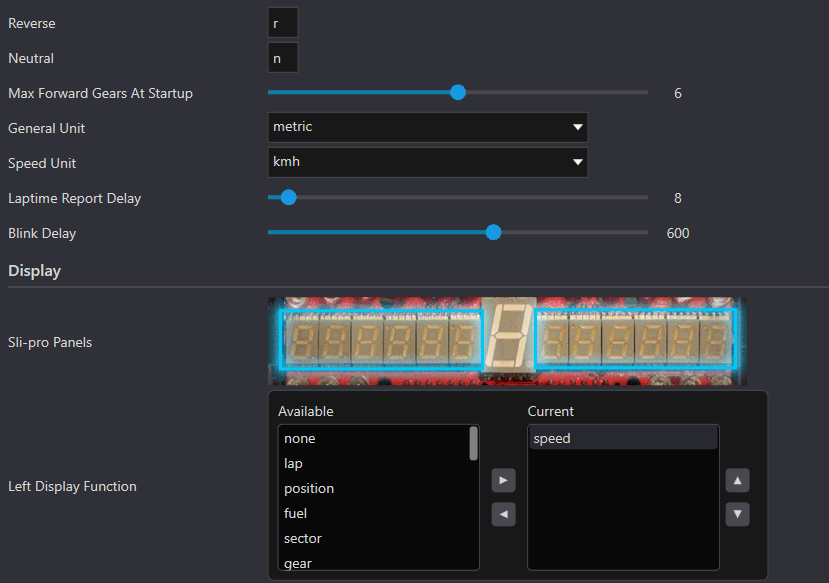
            <option name="reverse" tooltip="Character used for reverse gear" type="char">r</option>
            <option name="neutral" tooltip="Character used for neutral gear" type="char">n</option>
            <option name="max forward gears at startup" tooltip="Maximum number of forward gears detected at startup" type="slider" range="4,8">6</option>
        </gear>
        <option name="general unit" tooltip="Unit system used for telemetry" type="enum" enum="metric,imperial">metric</option>
        <option name="speed unit" tooltip="Select unit used for speed" type="enum" enum="kmh,mph">kmh</option>
        <option name="laptime report delay" tooltip="Delay during lap time is reported" type="slider" range="1,130">8</option>
        <option name="blink delay" tooltip="Default blink delay (ms)" type="slider" range="16,1000">600</option>
    </general>
    <display>
		<option name="sli-pro panels" type="image">slipro_panels.png</option>
        <option name="left display function" tooltip="List of data shown on left display (first one is the default)" type="enum_list" enum="none,speed,lap,position,fuel,sector,gear,rpm,current lap time,last lap time,best lap time,gap vs leader,gap vs next,gap vs behind,delta time vs best,delta time vs last,laps remaining,brake bias,total laps,system date,system time,fuel:speed,position:speed,lap:speed,sector:speed,lap:total laps">speed</option>
        <option name="right display function" tooltip="List of data shown on right display (first one is the default)" type="enum_list" enum="none,speed,lap,position,fuel,sector,gear,rpm,current lap time,last lap time,best lap time,gap vs leader,gap vs next,gap vs behind,delta time vs best,delta time vs last,laps remaining,brake bias,total laps,system date,system time,fuel:speed,position:speed,lap:speed,sector:speed,lap:total laps">current lap time</option>
        <option name="quick info left function" tooltip="Data shown on left display when quick info button is triggered" type="enum" enum="none,speed,lap,position,fuel,sector,gear,rpm,current lap time,last lap time,best lap time,gap vs leader,gap vs next,gap vs behind,delta time vs best,delta time vs last,laps remaining,brake bias,total laps,system date,system time,fuel:speed,position:speed,lap:speed,sector:speed,lap:total laps">position</option>
        <option name="quick info right function" tooltip="Data shown on right display when quick info button is triggered" type="enum" enum="none,speed,lap,position,fuel,sector,gear,rpm,current lap time,last lap time,best lap time,gap vs leader,gap vs next,gap vs behind,delta time vs best,delta time vs last,laps remaining,brake bias,total laps,system date,system time,fuel:speed,position:speed,lap:speed,sector:speed,lap:total laps">fuel</option>
        <controls>
            <slipro>
                <option signature="" device="" name="sw up-down left display" tooltip="Input to change left display pages" type="input"></option>
                <option signature="" device="" name="sw up-down right display" tooltip="Input to change right display pages" type="input"></option>
                <option signature="0" device="0" name="btn quick information" tooltip="Input to show quick information" type="input">0</option>
            </slipro>
        </controls>
    </display>
    <shiftlights>
        <option name="shift-lights function allowed" tooltip="Enable shift-lights feature" type="bool">true</option>
        <option name="shift-lights method" tooltip="Select shift-lights animation method" type="enum" enum="Progressive,Alternate,Percentage,Absolute,Side To Center,F1 Semi Progressive,F1 KERS+Alternate,F1 Reverse KERS+Alternate">Percentage</option>
        <option name="rpm threshold percentage" tooltip="RPM percentage thresholds for each LED" type="rpm_curve">55,60,64,68,74,75,80,85,90,95,97,98,99</option>
        <option name="rpm threshold absolute" tooltip="Absolute RPM thresholds for each LED" type="rpm_curve_abs">5452,5545,5823,6354,6410,6675,7252,7545,7823,8354,8510,8655,8675</option>
        <option name="blank shift-lights with last gear" tooltip="Disable shift-lights in highest gear" type="bool">false</option>
    </shiftlights>
    <pitlimiter>
        <option name="pit-limiter function allowed" tooltip="Enable pit limiter feedback" type="bool">true</option>
        <option name="pit-limiter active state" tooltip="LED pattern when pit limiter blink state is on" type="rpm_led" colors="GGGGRRRRRBBBB">5461</option>
        <option name="pit-limiter alternate state" tooltip="LED pattern when pit limiter blink state is off" type="rpm_led" colors="GGGGRRRRRBBBB">2730</option>
        <option name="pit-limiter on rpm led only" tooltip="Use only RPM LED for pit limiter feedback" type="bool">false</option>
        <option name="pit-limiter blink delay" tooltip="Blink delay for pit limiter feedback (ms)" type="slider" range="16,1000">600</option>
    </pitlimiter>
    <shiftpoints>
        <option name="optimal shift-points function allowed" tooltip="Enable optimal shift-points (OSP) feedback" type="bool">true</option>
        <option name="optimal shift-points method" tooltip="Select optimal shift-points behavior method" type="enum" enum="Default,Default and Last RPM blinking,Default Blinking and Last RPM Not Blinking,Last RPM Alone Blinking,Last RPM Alone Not Blinking">default</option>
        <option name="optimal shift-points factor" tooltip="Optimal shift-points factor (low value: demanding, high value: safe)" type="slider" range="10,250">128</option>
        <option name="optimal shift-points factors match gear ratio allowed" tooltip="Adjust shift-points factors automatically to gear ratios (see below)" type="bool">false</option>
        <option name="optimal shift-points factors values" tooltip="Per gear optimal shift factors" type="osp_gear_list">1.8,1.5,1.1,1.0,1.0,1.0,1.0,1.0,1.0</option>
        <option name="optimal shift-points on first gear allowed" tooltip="Enable optimal shift-points feedback in first gear" type="bool">false</option>
        <option name="optimal shift-points blink delay" tooltip="Blink delay for optimal shift-points feedback (ms)" type="slider" range="10,200">50</option>
        <controls>
            <slipro>
                <option signature="0" device="0" name="btn up osp factor" tooltip="Input to increase optimal shift-points factor" type="input">0</option>
                <option signature="0" device="0" name="btn down osp factor" tooltip="Input to decrease optimal shift-points factor" type="input">0</option>
            </slipro>
        </controls>
    </shiftpoints>
    <brightness>
        <option name="global brightness" tooltip="Set overall device brightness level" type="slider" range="1,254">200</option>
        <option name="brightness step value" tooltip="Brightness adjustment step value (used by input)" type="number">10</option>
        <option name="display brightness state" tooltip="Enable or disable display brightness control" type="bool">true</option>
        <controls>
            <slipro>
                <option signature="0" device="0" name="btn up brightness" tooltip="Input to increase brightness" type="input">0</option>
                <option signature="0" device="0" name="btn down brightness" tooltip="Input to decrease brightness" type="input">0</option>
            </slipro>
        </controls>
    </brightness>
    <led info="leds layout" num_external="5">
        <option name="led abs" tooltip="Assign LED for ABS status" type="flag_external_led">2048</option>
        <option name="led traction control" tooltip="Assign LED for traction control status" type="flag_external_led">4096</option>
        <option name="led damage" tooltip="Assign LED for vehicle damage status" type="flag_external_led">4</option>
        <option name="led drs legal" tooltip="Assign LED for DRS availability" type="flag_external_led">0</option>
        <option name="led drs" tooltip="Assign LED for DRS active state" type="flag_external_led">512</option>
        <option name="led headlights" tooltip="Assign LED for headlights status" type="flag_external_led">0</option>
        <option name="led kers" tooltip="Assign LED for KERS status" type="flag_external_led">0</option>
        <option name="led lowfuel" tooltip="Assign LED for low fuel warning" type="flag_external_led">8</option>
        <option name="led optimal shift-points" tooltip="Assign LED for optimal shift-points feedback" type="flag_external_led">33</option>
        <option name="led overheating" tooltip="Assign LED for engine overheating" type="flag_external_led">1028</option>
        <option name="led pit request" tooltip="Assign LED for pit request status" type="flag_external_led">0</option>
        <option name="led pit-limiter" tooltip="Assign LED for pit limiter status" type="flag_external_led">2048</option>
        <option name="led power" tooltip="Assign LED for power status" type="flag_external_led">256</option>
        <option name="led rev limit" tooltip="Assign LED for rev limiter status" type="flag_external_led">0</option>
        <option name="led start lights" tooltip="Assign LED for race start lights" type="flag_external_led">0</option>
        <option name="led green flag" tooltip="Assign LED for green flag state" type="flag_external_led">0</option>
        <option name="led blue flag" tooltip="Assign LED for blue flag state" type="flag_external_led">1</option>
        <option name="led yellow flag" tooltip="Assign LED for yellow flag state" type="flag_external_led">2050</option>
        <option name="led full yellow flag" tooltip="Assign LED for full course yellow state" type="flag_external_led">18</option>
        <option name="led black flag" tooltip="Assign LED for black flag state" type="flag_external_led">0</option>
    </led>
</settings>
Example For 3DOF Motion Simulator:
<?xml version="1.0" encoding="utf-8"?>
<settings info="3DOF Motion Simulator default settings" version="1" type="template">
    <!-- FILTERS GLOBAL -->
    <option name="smoothing factor" id="filter-smooth-factor" tooltip="Global smoothing factor for all motion signals (0 = none, 1 = max)" type="slider" range="0.0,1.0">0.20000000298023224</option>
    <option name="separator" id="separator" type="separator"/>
    <!-- PITCH -->
    <option name="gain pitch" id="gain-pitch" tooltip="Amplitude gain for pitch motion" type="slider" range="0.0,500.0">138.00</option>
    <option name="pitch in use" id="in-use-pitch" tooltip="Enable pitch motion" type="bool">true</option>
    <option name="pitch inverted" id="invert-pitch" tooltip="Invert pitch motion direction" type="bool">false</option>
    <option name="pitch smooth" id="smooth-pitch" tooltip="Apply smoothing filter to pitch motion" type="bool">false</option>
    <option name="separator" id="separator" type="separator"/>
    <!-- ROLL -->
    <option name="gain roll" id="gain-roll" tooltip="Amplitude gain for roll motion" type="slider" range="0.0,500.0">138.00</option>
    <option name="roll in use" id="in-use-roll" tooltip="Enable roll motion" type="bool">true</option>
    <option name="roll inverted" id="invert-roll" tooltip="Invert roll motion direction" type="bool">false</option>
    <option name="roll smooth" id="smooth-roll" tooltip="Apply smoothing filter to roll motion" type="bool">false</option>
    <option name="separator" id="separator" type="separator"/>
    <!-- ACCEL Z (SURGE) -->
    <option name="gain surge" id="gain-accelz" tooltip="Amplitude gain for surge (forward/backward) motion" type="slider" range="0.0,50.0">3.50</option>
    <option name="surge in use" id="in-use-accelz" tooltip="Enable surge motion" type="bool">true</option>
    <option name="surge inverted" id="invert-accelz" tooltip="Invert surge motion direction" type="bool">false</option>
    <option name="surge smooth" id="smooth-accelz" tooltip="Apply smoothing filter to surge motion" type="bool">true</option>
    <option name="separator" id="separator" type="separator"/>
    <!-- ACCEL X (SWAY) -->
    <option name="gain sway" id="gain-accelx" tooltip="Amplitude gain for sway (left/right) motion" type="slider" range="0.0,50.0">2.70</option>
    <option name="sway in use" id="in-use-accelx" tooltip="Enable sway motion" type="bool">true</option>
    <option name="sway inverted" id="invert-accelx" tooltip="Invert sway motion direction" type="bool">false</option>
    <option name="sway smooth" id="smooth-accelx" tooltip="Apply smoothing filter to sway motion" type="bool">true</option>
    <option name="separator" id="separator" type="separator"/>
    <!-- ACCEL Y (HEAVE) -->
    <option name="gain heave" id="gain-accely" tooltip="Amplitude gain for heave (up/down) motion" type="slider" range="0.0,50.0">4.21</option>
    <option name="heave in use" id="in-use-accely" tooltip="Enable heave motion" type="bool">true</option>
    <option name="heave inverted" id="invert-accely" tooltip="Invert heave motion direction" type="bool">false</option>
    <option name="heave smooth" id="smooth-accely" tooltip="Apply smoothing filter to heave motion (usually false for texture)" type="bool">false</option>
    <option name="separator" id="separator" type="separator">Traction Loss Configuration</option>
    <!-- YAW RATE -->
    <option name="gain yaw rate" id="gain-yaw-rate" tooltip="Amplitude gain for yaw rate motion" type="slider" range="0.0,100.0">5</option>
    <option name="yaw rate in use" id="in-use-yaw-rate" tooltip="Enable yaw rate motion" type="bool">false</option>
    <option name="yaw rate inverted" id="invert-yaw-rate" tooltip="Invert yaw rate motion direction" type="bool">false</option>
    <option name="yaw rate smooth" id="smooth-yaw-rate" tooltip="Apply smoothing filter to yaw rate motion" type="bool">false</option>
    <option name="separator" id="separator" type="separator"/>
    <!-- PITCH RATE -->
    <option name="gain pitch rate" id="gain-pitch-rate" tooltip="Amplitude gain for pitch rate motion" type="slider" range="0.0,100.0">5</option>
    <option name="pitch rate in use" id="in-use-pitch-rate" tooltip="Enable pitch rate motion" type="bool">false</option>
    <option name="pitch rate inverted" id="invert-pitch-rate" tooltip="Invert pitch rate motion direction" type="bool">false</option>
    <option name="pitch rate smooth" id="smooth-pitch-rate" tooltip="Apply smoothing filter to pitch rate motion" type="bool">false</option>
    <option name="separator" id="separator" type="separator"/>
    <!-- ROLL RATE -->
    <option name="gain roll rate" id="gain-roll-rate" tooltip="Amplitude gain for roll rate motion" type="slider" range="0.0,100.0">5</option>
    <option name="roll rate in use" id="in-use-roll-rate" tooltip="Enable roll rate motion" type="bool">false</option>
    <option name="roll rate inverted" id="invert-roll-rate" tooltip="Invert roll rate motion direction" type="bool">false</option>
    <option name="roll rate smooth" id="smooth-roll-rate" tooltip="Apply smoothing filter to roll rate motion" type="bool">false</option>
</settings>
6. Supported Concepts
Options
Each <option> defines:
- name (identifier)
- type (UI + data type)
- attributes:
tooltip(optional)- slider /
range enum- etc.
- default value
UI-driven types (examples)
type="char"type="number”type="slider" range="1,254"type="enum" enum="metric,imperial"type="image"type="bool"type="image"type="enum_list" enum="none,speed,lap,position,fuel"type="rpm_curve"(percentage value)type="rpm_curve_abs"(absolute rpm value)type="rpm_led" colors="GGGGRRRRRBBBB"type="osp_gear_list"type="flag_external_led"(bitmask)- and others, check the profile_template.xml provided in OutPlugins folder for more info
Hierarchy
- Nested groups are allowed, examples:
<general> </general>
<display> </display>
<shiftlights> </shiftlights>
<pitlimiter> </pitlimiter>
<shiftpoints> </shiftpoints>
<brightness> </brightness>
<led num_external="5"> </led>
This structure directly maps to UI layout.
7. Profile Lifecycle
Managed entirely by the host:
User actions:
- Create
- Clone
- Modify
- Save
- Delete
- Set as autosetup
- Load (make it active for current game)
Automatic behavior:
- Autosetup profile loaded when:
- game is detected and IN game plugin loaded
8. Plugin Interaction (Critical)
Plugins do not directly manage profile files.
Instead, they react to changes via:
OnContextChanged(OpenSRContextChange reason)

GameProfileHelper class is a standalone helper class used to parse OpenSR game profile XML files (included with the SDK).
9. Change Notification System (callback)
Triggered when:
- Profile changes:
osr::OpenSRContextChange::ProfilePathChanged - Settings change:
osr::OpenSRContextChange::SettingsChanged - Device check requested:
osr::OpenSRContextChange::CheckDevice
Example:
void MyDeviceOutPlugin::OnContextChanged(osr::OpenSRContextChange reason) {
    if (m_pContext && reason == osr::OpenSRContextChange::ProfilePathChanged) {
        std::wstring profilePath = m_pContext->currentProfilePath;
        if (!profilePath.empty()) {
             LoadConfiguration(profilePath);
        }
    }
    else if (m_pContext && reason == osr::OpenSRContextChange::SettingsChanged) {
        if (!m_pluginPath.empty()) {
            std::wstring settingsPath = StringUtils::createWString(m_pContext->osrDocFolder, L"\\", m_pluginPath, "\\settings.xml");
            if (!LoadPluginSettings(settingsPath, m_pluginSettings)) {
                // ...
            }

        }
    }
    else if (reason == osr::OpenSRContextChange::CheckDevice) {
        CheckDevice();
    }
}
10. Plugin Responsibilities
On notification:
For Profile:
- Reload xml configuration from:
currentProfilePath
For settings:
- Reload from:
settings.xmlin plugin folder
For Checking Device:
- run a function to check the device managed by the plugin
11. Versioning
Rule:
version="1"
- All future changes are:
- backward compatible
- No strict version migration required
12. Separation of Concerns
Profiles (profile_template.xml)
- Game-specific behavior
- Device mapping / telemetry usage
Settings (settings.xml or settings.dll)
- General plugin configuration
Key point:
They are:
- independent systems
- only linked via:
- the same notification callback
13. Developer Experience Features
- Dashboard provides:
- full UI generation
- asset rendering
- profile management
- Shortcut:
CTRL + Clickon plugin opens plugin folder
14. Design Philosophy
- XML defines:
- structure
- behavior
- UI
- Host handles:
- complexity
- persistence
- UX
- Plugin focuses on:
- execution logic
- reacting to notifications